



MTM
Multi Technology Manager-
 Simplified example of a 4-pipe system with one chiller and two EXP multipurpose units managed by KMTM/TI. The system provides for the units to operate throughout the year, with the production of cold and hot water at the same time or independently.
Intelligent management of Rhoss hydronic units
Description
MTM – THE OFFER
MTM is available in two configurations but with one goal: to efficiently manage the units selected for the system.
MTM/SI – with graphic interface and standard functions such as the display of unit operating parameters, operating status, alarms, etc.
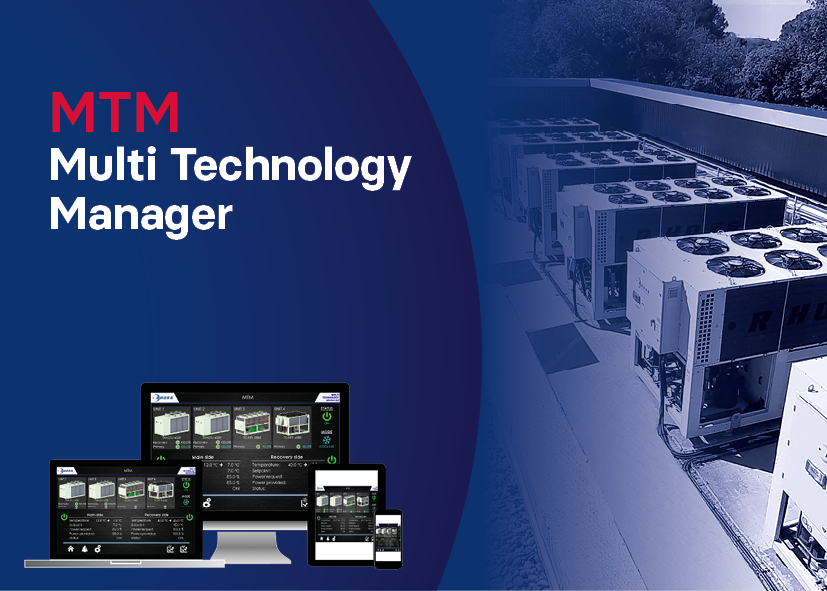
MTM/TI – with Touch graphic interface and advanced functions. Access to the various pages, for consultation and parameter editing, is simplified in the 7" display; it is also possible to view, through graphs, the trends of water/air temperatures and e-mail notification of any alarm can be set
MTM - Types of units managed
Multipurpose units
Reversible heat pumps and HT65 heat pumps
Chillers also with freecooling and inverter technology
Condenserless units
The units can operate at variable flow rate with the innovative VPF by Rhoss.
WHY CHOOSE MTM
Ideal for using different technologies
Management of RHOSS refrigeration units present in the system by optimising the specific technologies used (chillers, heat pumps and multipurpose units).
In addition to managing homogeneous units, it is possible to combine EXP MULTIPURPOSE units with CHILLERS or HEAT PUMPS and units with different sizes and versions.
Ideal for ensuring system loads
In medium-large systems, MTM meets the required thermal loads in a precise and stable manner throughout the year.
In the case of systems with both 2 pipes + DHW and 4 pipes, where there is the demand for even unbalanced refrigeration and thermal loads, the possibility of managing units with different technology and power, optimises efficiency and the overall offer of the system.
Ideal because easy to connect
MTM is connected to the chiller units, hydraulically connected in parallel to each other, via serial network (*).
The user interacts in a simple way with the manager, via a graphic interface (standard or Touch).
MTM connectivity to BMS systems is guaranteed through accessory serial interfaces, with MODBUS, BacNet MS/TP, BacNet IP, TCP/IP Modbus protocols.
If there is a need to monitor and act on MTM from a remote station using specific web pages, MTM/TI is set up for connection to a company LAN network or to enable access via any Web browser from mobile devices (e.g. smartphone, tablet).
(*) the RS485 serial board is required in some units. See the price list for more information
Ideal because easy to configure
The value of a manager like MTM is also measured by the simplicity of the installation. Thanks to the WIZARD procedure introduced and the Self-learning function of the connected units, the user is guided through the first device configuration to be immediately ready and operational.
Ideal for any installation
MTM is designed, in the standard configuration, to automatically start-up the hydronic units. Once the individual units present are recognised, it decides which strategy to use to maximise efficiency, for example preferring freecooling units if the outdoor temperature is favourable, inverter technology for the best power modulation or simultaneous operation (cooling+heating) of the multipurpose units. It is also possible to “customise” unit management, according to the customer's preferences or type of system, even with the Backup function in the most sensitive installations. The Booster function, which can be set if there is a Backup unit, can meet the various peak loads that may occur throughout the year.
Ideal for service
MTM simplifies SERVICE operation as the implemented algorithms enable optimal operation of the group of units even in case of partial dysfunctions.
MTM provides the history of the alarms and, in case of MTM/TI version, also the notification function by mail/message to designated users.
Ideal for having the situation under control
MTM is accessible:
Directly from the device (KMTM/SI and KMTM/TI) through the present graphic interface.
From a BMS connected to the device (KMTM/SI and KMTM/TI) through serial interfaces Through the dedicated Web pages (KMTM/TI only).
In this case, the pages can be accessed via LAN connection or WEB APP
Technical data
| UNIT MANAGEMENT AND TYPE | KMTM/SI | KMTM/TI | ||||
| Maximum number of controllable units | 10 | 10 | ||||
| Management of CHILLERS, HEAT PUMPS, EXP UNITS, FREECOOLING UNITS, CONDENSERLESS UNITS | x | x | ||||
| Advanced management of STANDARD+FREECOOLING CHILLERS | x | x | ||||
| Advanced management of EXP MULTIPURPOSE UNITS+CHILLERS in 4-pipe systems | x | x | ||||
| Advanced management of EXP MULTIPURPOSE UNITS+HEAT PUMPS (connected to main circuit) in 2-pipe+DHW systems | x | x | ||||
| Advanced management of EXP MULTIPURPOSE UNITS+HEAT PUMPS (connected to main circuit/reverse recovery) | x | x | ||||
| Advanced management of external pumping unit(s), primary side. Option of managing single by single pump | x | x | ||||
| MANAGEMENT LOGICS AND ADVANCED FUNCTIONS | KMTM/SI | KMTM/TI | ||||
| STANDARD, based on the type of units connected, used technology, operating hours | x | x | ||||
| ADVANCED, based on customisable SATURATION or EQUALISATION logics | x | x | ||||
| Choice of the type of balancing of the operating hours | x | x | ||||
| BACKUP unit management | x | x | ||||
| Advanced management of units with VPF by RHOSS (primary side variable flow rate) | x | x | ||||
| ADJUSTMENT | KMTM/SI | KMTM/TI | ||||
| Adjustment on delivery or return | x | x | ||||
| Adjustment with climatic compensation | x | x | ||||
| Advanced double set point, sliding set point | x | x | ||||
| Advanced function of forced limitation of the absorbed power | x | x | ||||
| ACCESSIBILITY TO THE MTM DEVICE | KMTM/SI | KMTM/TI | ||||
| Multilingual user interface | x | x | ||||
| Standard graphic interface | x | |||||
| Touch screen graphic interface | x | |||||
| Access from BMS system (including optional serial boards with specific protocols) | x | x | ||||
| Access from dedicated web pages (MTM in LAN connection with the building where the units are installed) | x | |||||
| Access from dedicated web pages via WEB APP (Enabling is optional) | x | |||||
| UNIT MONITORING | KMTM/SI | KMTM/TI | ||||
| Status display, setting and reading of the most important unit parameters, .. | x | x | ||||
| Reading of active alarms of the individual units and alarms log display | x | x | ||||
| Alarm notification via e-mail | x | |||||
| Graphs of the main variables (e.g. water/air temperature trend of the units) | x | |||||
| Sending periodical report (e.g. water/air temperature trend of the units) | x |
Manuals
To view all the documents, log in to the reserved area
Technical notes
To view all the documents, log in to the reserved area
Documents
To view all the documents, log in to the reserved area
Images
Request information about this product
Find a reseller in your area for a customized offer on Rhoss air conditioning solutions.